Cursor Enterprise Deployment and Codebase Context Configuration
Cursor works best when deployment and governance come before you configure codebase context.

A Cursor enterprise rollout that stops once the editor is installed and governance policies are set delivers only half of what the tool can do. Agents running without reliable, organization-wide knowledge of a company's codebase are still guessing at structure they cannot see, no matter how well the deployment around them is locked down. Governance without that context produces a tool that is well-controlled but shallow: IT knows who can log in, which models are approved, and what data can leave the environment, but the agent itself still works blind on anything beyond the files in its immediate context window. Context without governance runs the opposite risk: capable agents that read files, write files, run terminal commands, and call external APIs with no one tracking what they touched or why. Cursor's own feature set reflects this order of operations, and the rest of this piece follows it: deployment and governance first, because they decide who can access what and what data leaves the building, and the context layer after, because it depends on a secure foundation already being in place.
The security stakes of getting the order wrong are specific. Cursor's agents don't just suggest code, they execute it: reading and writing files, running terminal commands, and calling out to external APIs on their own initiative. If you add an extension marketplace that isn't a major vendor's own, plus MCP connections to internal tools like Jira and GitHub, the attack surface extends well past what a traditional IDE policy was ever built to cover. At the same time, the upside for getting this right is just as concrete. Studies of large developer populations have found that AI coding tools save meaningful time per engineer each week, but on complex codebases, research has found that agents without tacit knowledge of how a system is structured can slow developers down. Whether a given rollout lands on the productive side of that line or the costly one depends almost entirely on whether the context layer was built with the same rigor as the governance layer around it. Deployment and access control have to be correct before context configuration begins, because context built on top of an ungoverned deployment just gives a wider-reaching agent more to expose.
The three-tier organizational structure Cursor Enterprise uses to govern large, multi-team deployments
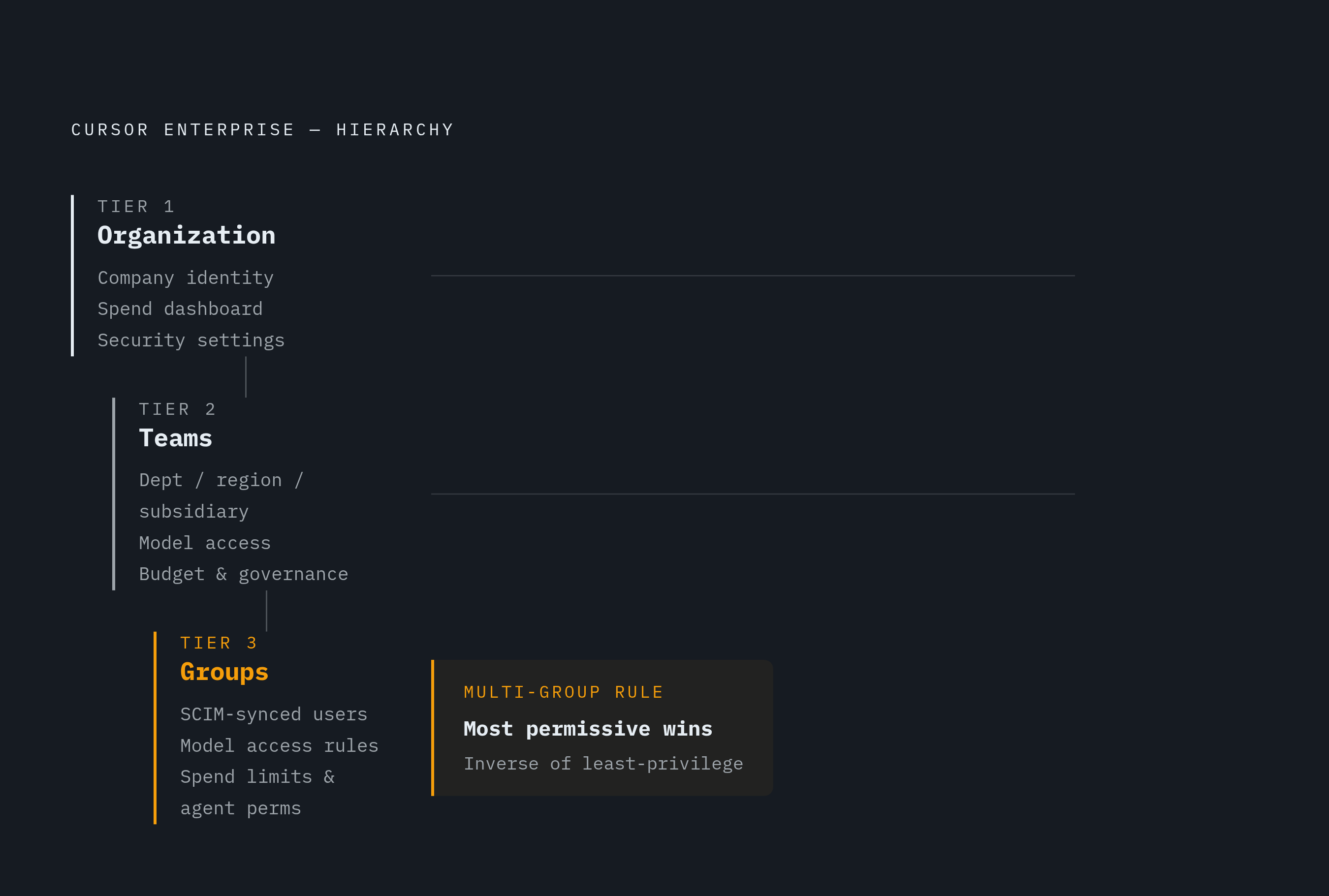
Cursor's Organizations layer, generally available to Enterprise customers since June 3, 2026, gives large companies a single administrative structure to replace what used to be a set of loosely connected team accounts. The structure has three levels: Organization, Teams, and Groups, and each one answers a different administrative question.
The Organization sits at the top as the company-wide identity and admin container. It provides one dashboard with a rollup of spend and token usage across every team in the company, along with centralized configuration for security and governance settings that apply company-wide. Teams sit below that as operating units, mapped to however the business is actually structured: a department, a region, a subsidiary. Each team carries its own settings for security, governance, budget, and model access, while still rolling up into the organization-wide view for anyone with visibility at that level. Groups are the finest-grained layer: lightweight collections of users, within a single team or crossing several, that get their own model access rules, spend limits, and agent permissions without the overhead of standing up an entirely new team. Groups sync through SCIM, so group membership can track whatever grouping already exists in the company's identity provider.
The identity provider itself only needs to be configured once at the organization level, and that configuration can be reused by every team and group underneath it. If a subsidiary or acquired business already has its own identity provider in place, individual teams can keep running it alongside the shared organization-level one. Either way, you no longer need the redundant per-team identity setup that used to complicate multi-team deployments.
The structure's biggest practical use case is model segmentation by function. Engineering and product teams can be granted frontier models and larger budgets, while non-product roles get restricted model access, lower budgets, and tighter limits on which agent commands are allowed to run without a human approving them first, demonstrating the segmentation value that makes the three-tier structure worth adopting.
One default in this system deserves direct scrutiny before any organization standardizes on it: when a user belongs to more than one group, the most permissive setting wins. Cursor's own documentation confirms this directly, stating that overlaps resolve toward the most permissive result. That's the inverse of how least-privilege policy normally cascades in enterprise security, where the most restrictive applicable rule is usually the one that governs. Any security team configuring groups needs to treat this as a setting to override explicitly, not an assumption to inherit by default.
Deploying the Cursor Editor to Developer Machines Using MDM and Platform-Specific Policy Mechanisms
Once the organizational structure is decided, the editor still has to land on actual machines, and Cursor's standard path for that in an enterprise setting runs through mobile device management software. IT packages the Cursor application and pushes it out through whatever MDM platform the organization already uses, such as Jamf, Kandji, or Intune. Developers get Cursor installed on their primary machines with no manual installation step on their end, and the policy controls that MDM exposes matter more: they let IT set organizational standards at the operating system level before a single user ever opens a settings menu.
The mechanism for applying those policies differs by platform. On Windows, it runs through registry-based Group Policy: ADMX and ADML files are copied from AppData\Local\Programs\cursor\policies, with the ADMX file placed into C:\Windows\PolicyDefinitions and the ADML file placed into the corresponding language subfolder under that same directory. Policies can be applied at either the Computer or the User level, and where the two conflict, the Computer-level policy takes precedence. On macOS, the equivalent mechanism is a.mobileconfig configuration profile pushed through MDM.
A handful of policy controls matter most in practice. AllowedTeamId restricts which team IDs are permitted to log in at all, and any user attempting to sign in with an unauthorized team ID gets forcefully logged out. This is the primary lever for stopping someone from using a personal Cursor account on a company-managed machine. AllowedExtensions controls which extensions are permitted to install, and this carries extra weight because Cursor's extension marketplace isn't run by a major platform vendor, so it doesn't get the same vetting that IT teams may already trust. UpdateMode governs automatic update behavior, including the option to disable automatic updates outright, and this setting matters if an organization is trying to hold a version-locked security posture given Cursor's CVE history. WorkspaceTrustEnabled controls whether Workspace Trust is enforced on the machine.
For organizations doing unattended, scripted installs on Windows, the installer accepts a standard set of silent-install flags: /SILENT /VERYSILENT /SUPPRESSMSGBOXES /NORESTART /CLOSEAPPLICATIONS. The command-line interface also exists as a separate deployment surface for CI/CD pipelines and other automation use cases, so it's distinct from installing the editor on developer workstations.
Whatever value gets set through MDM or Group Policy overrides the Cursor setting at every other level, whether that's a user preference, a workspace-level setting, or the application default, and it prevents the user from changing it locally. That's a global override enforced at the OS layer, not a suggestion the user can work around from inside the editor.
Authentication, SSO, and SCIM provisioning as the access control foundation
Getting the editor onto machines and the organizational hierarchy configured doesn't mean much if anyone can still log in with whatever credentials they want. SSO enforcement and automated provisioning are what make the three-tier structure actually binding, rather than a dashboard that looks organized but has no real teeth behind it.
Enforcing SSO means disabling local login entirely, so every authentication attempt routes through the organization's identity provider instead of a username and password Cursor manages itself. The AllowedTeamId policy covered in the previous section is what makes this enforceable at the device level: a managed machine simply won't let a login through with a team ID that doesn't match, which is what actually closes off local login as an option.
SCIM 2.0 provisioning and deprovisioning is available on Enterprise plans. Its operational value is in the deprovisioning half: when someone leaves the company, their access to Cursor is revoked automatically rather than waiting on IT to manually remove it, closing the gap that often opens up between an employee's last day and the actual revocation of their tool access. Because the identity provider is set up once at the organization level and shared down through every team and group, this SSO configuration also doesn't need to be rebuilt for each operating unit, a real reduction in administrative work for any company running more than a handful of teams.
Two more Enterprise-only features round out this layer, and both tend to come up in security review before a rollout is approved. Audit logs are restricted to Enterprise plans, and compliance programs frequently require them, so organizations that need them have to go Enterprise regardless of how many seats they're actually buying. Log streaming into SIEM tools, specifically a Splunk HTTP Event Collector, Sumo Logic, an HTTPS webhook, or an S3 bucket, is also Enterprise-only, and it matters for any security operations center that expects to ingest Cursor's events into infrastructure it already runs.
The security controls Cursor Enterprise provides and the gaps that require additional hardening
Cursor Enterprise covers the security requirements most organizations bring to a rollout, but a few real gaps still require explicit decisions from the engineering and security teams doing the deployment, not just a platform setting.
On the provided side, Cursor holds SOC 2 Type II certification, undergoes penetration testing at least annually, encrypts data at rest with AES-256, and encrypts data in transit with TLS 1.2 or higher. Self-hosted cloud agents, generally available since March 25, 2026, let Enterprise teams run Cursor's agent infrastructure on their own servers, so code, tool execution, and build artifacts never leave the organization's environment. Those agents still connect outbound over HTTPS to Cursor's cloud for inference and planning, but that connection requires no inbound ports, no firewall changes, and no VPN tunnel to set up. Cursor Router, which shipped July 22, 2026, is available on both Teams and Enterprise plans and lets admins configure optimization modes, choose whether the routed model is shown to the user, and enforce Auto mode with either soft or hard enforcement. Enterprise plans also add per-commit AI code attribution and Cursor Blame, which distinguishes AI-authored from human-authored code directly inside git blame.
The clearest structural gap is that Cursor runs on SOC 2 Type II compliant AWS infrastructure and doesn't offer a fully on-premises or air-gapped deployment option. If your organization is under regulatory requirements that prohibit code from leaving infrastructure you control, no configuration choice resolves that dividing line. It's a fact to plan around.
Two configuration tools govern what the agent can actually touch. The.cursorignore file excludes files from agent access using syntax that mirrors.gitignore, and Cursor's defaults already exclude.env files,.git directories, and lock files without any manual configuration. Beyond those defaults, community hardening guides recommend adding patterns like .pem, .key, secrets/, credentials/,.aws/,.azure/, and terraform.tfvars, as community recommendations distinct from Cursor's own prescribed list. permissions.json governs broader agent permissions, with admin-controlled settings on the team dashboard overriding the managed file, per-user and per-repo files merging by concatenation, and editor settings not merging with either. Cursor watches both permissions.json paths continuously, so a change takes effect without requiring anyone to restart the editor.
One governance task sits entirely outside Cursor's own controls: requiring human PR review for AI-generated commits is enforced at the git provider level, not inside Cursor itself. GitHub and GitLab branch protection rules have to be configured so that every commit to main requires a pull request review regardless of whether a human or an agent wrote it.
Version enforcement is not a matter of preference. Cursor's patch history includes a sandbox escape vulnerability via git hooks in versions below 2.5, rated CVSS 9.9 Critical by NVD and 8.1 High by Cursor's own CNA advisory. That gap between the two scoring bodies doesn't change the practical instruction: organizations need to keep Cursor current rather than freezing on an older version for stability's sake. The UpdateMode policy covered earlier should be used to keep updates controlled and predictable.
MCP server governance: the integration attack surface that enterprise policy must explicitly address
The Model Context Protocol is where Cursor's deployment controls and its context layer meet directly, and it's also the single point in an enterprise rollout most likely to be misconfigured, because MCP's security model is newer and less mature than SSO or MDM policy that IT teams have governed for years.
MCP is what connects Cursor's agent to tools and data sources outside the codebase itself: Jira, Linear, GitHub, internal database connectors, and internal APIs. That connection gives the agent the ability to read from and act on systems well beyond the files it has open, and every one of those connections is a potential point for injecting instructions the agent wasn't meant to follow.
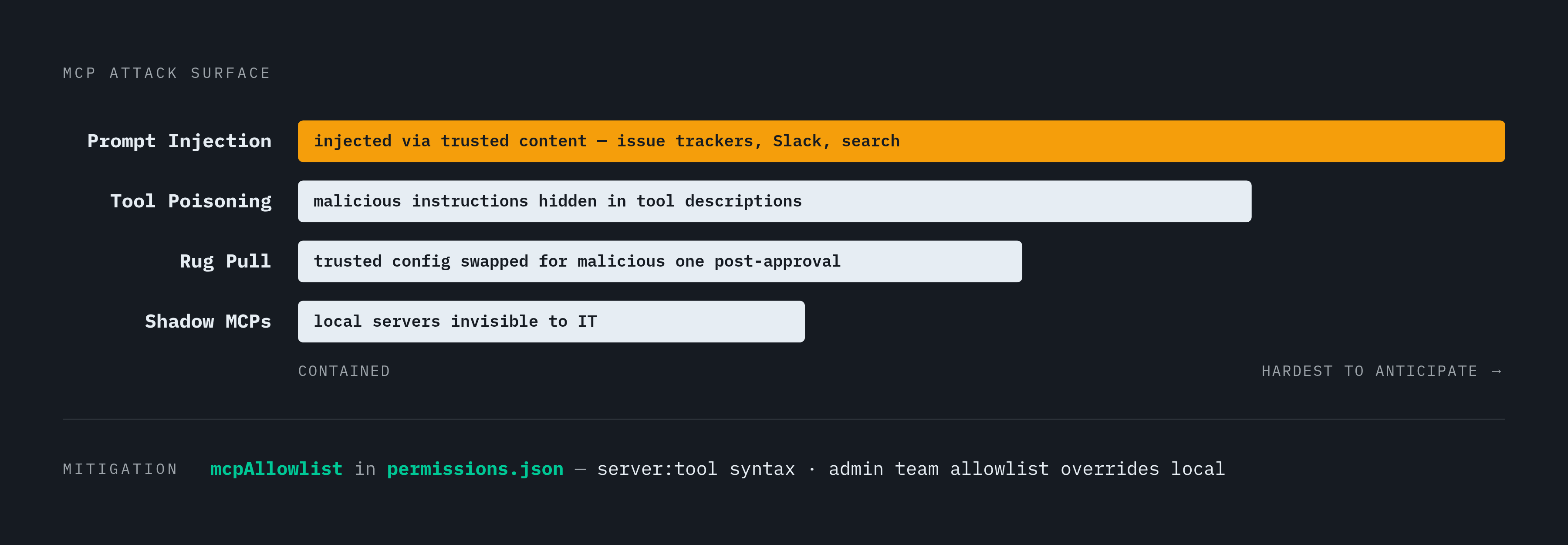
MCP shipped without built-in authentication, and several attack patterns follow directly from that gap. Tool poisoning embeds malicious instructions inside a tool's description, so it redirects the agent's behavior without the developer ever seeing anything unusual in the conversation itself. Rug pull attacks work over time: a developer approves a legitimate MCP configuration, and that configuration is later swapped for a malicious one after trust has already been established. Shadow MCPs are local servers individual developers install on their own, so IT has no visibility into what's connected to the company's codebase. Prompt injection through MCP-connected services is perhaps the hardest to anticipate: content pulled in from an issue tracker, a Slack channel, or a search result can carry injected instructions that alter the agent's behavior the moment that content is processed.
The mcpAllowlist setting inside permissions.json is the main tool for governing this surface. Entries use server:tool syntax, with wildcard support: server: permits every tool from one named server, :tool permits one tool name regardless of which server offers it, and : permits every MCP tool across every server. As with the rest of permissions.json, admin-controlled allowlists set at the team level override whatever is defined in a local file.
The protocol itself is catching up to this risk. The MCP team has promoted Enterprise-Managed Authorization to stable status, adding centralized authorization controls built for enterprise deployments and letting organizations provision MCP server access through their identity provider rather than leaving it to individual developer approval. Any MCP server under evaluation for enterprise use should be checked against this standard before it's approved, because it's the clearest sign that an integration was built with enterprise governance in mind.